
A trading journal that doesn't feel like homework.
Upload a position screenshot from MetaTrader. Your trade data (entry, SL, TP, lot, profit) is logged on the spot and ready to analyze. See the patterns behind your results.
- Auto-fill from MetaTrader screenshots
- Rule checklist per setup
- 20+ analytics metrics
- No access to your broker account
Free forever. No credit card.
You have 300 trades. You don't have a single answer.
Account up, account down, back to zero. You switch strategies, pairs, timeframes. Same story every time.
You often know enough already. What's missing is a record that can answer your questions.
Your spreadsheet dies at row 40
Week one, you're diligent. Week two, you fill in the bare minimum. Week three, you stop. It's not your fault. Typing 18 columns by hand after every close is exhausting.
“Why do I keep losing?”
You can't answer that because your data was never complete. Which setup is leaking money? What time of day do you make the most mistakes? Nobody can tell you.
The same losses, over and over
FOMO in the London session. Moving your SL while the trade is in the red. Revenge trading after a stop-out. You know the pattern is there, but you've never seen it in black and white.
Trading is a game of probabilities. Without data, you're guessing.
From closed position to complete journal entry: 30 seconds.
- 01
Screenshot your position in MetaTrader
Close the position and screenshot the trade details. Pending orders that haven't filled work too. Paste it straight into LOGTRADE, no need to save a file first.
- 02
Let the fields fill themselves
Symbol, direction, lot, entry, close, SL, TP, profit, open & close time, all read from the image. You check them and add what matters: which setup it was, and how you felt at entry.
- 03
Let the numbers talk
After 20-30 trades, patterns start to show. Which setups make money. Which sessions you should stay away from. How far your execution drifts from your plan.
Other journals make you type. We ask for a screenshot.
LOGTRADE reads your MetaTrader screenshot right in your browser. No broker connection and no upload to a server. The image is processed on your own device and we never store it.
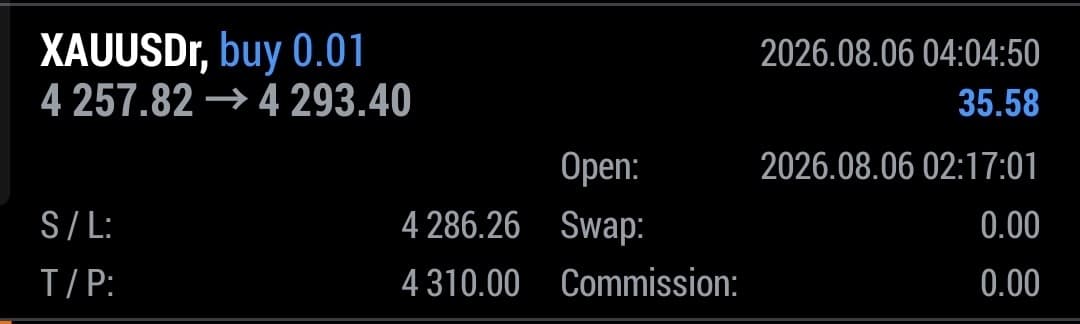
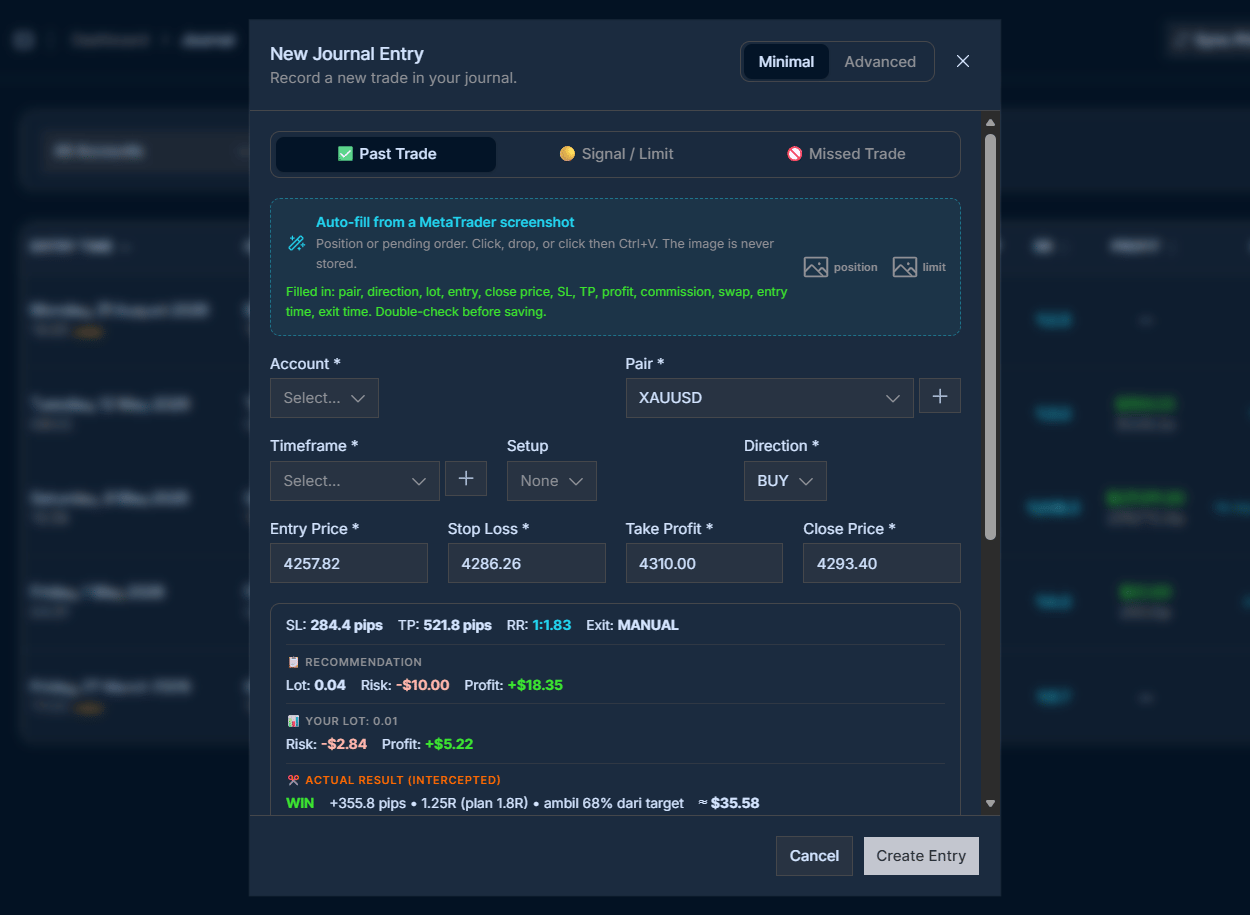
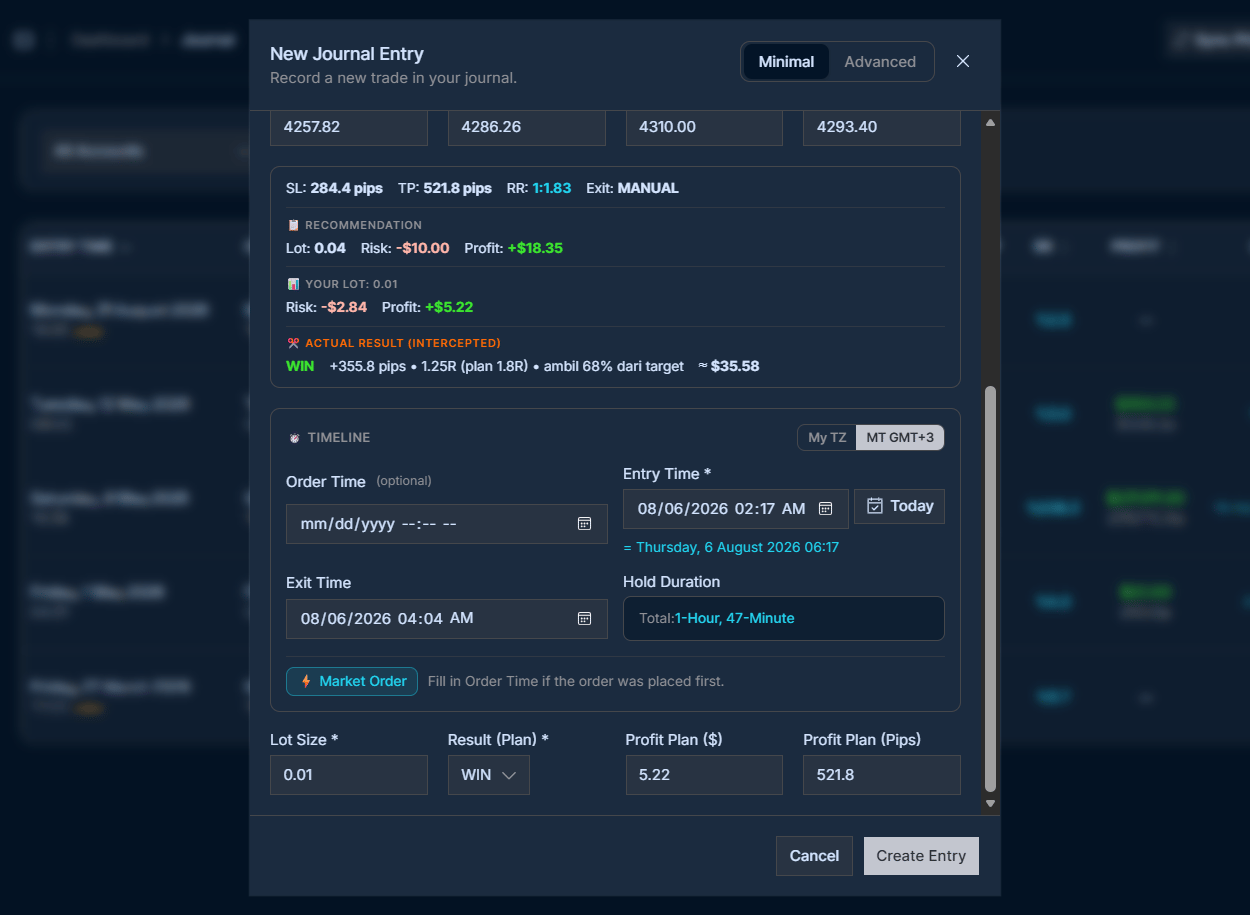
Read automatically
- Symbol
- Buy / Sell
- Lot size
- Entry price
- Close price
- Stop Loss
- Take Profit
- Profit
- Open time
- Close time
Works for pending orders too.
Screenshot a limit order that hasn't filled yet. LOGTRADE logs it as a signal, then keeps track of whether it gets hit or missed.
The image stays with you.
It's processed locally in your browser. We only keep the resulting numbers, and only in your own account.
That's the difference between a journal you keep for 3 days and one you keep for 3 years.
Everything you need to stop guessing.
Numbers that are honest with you
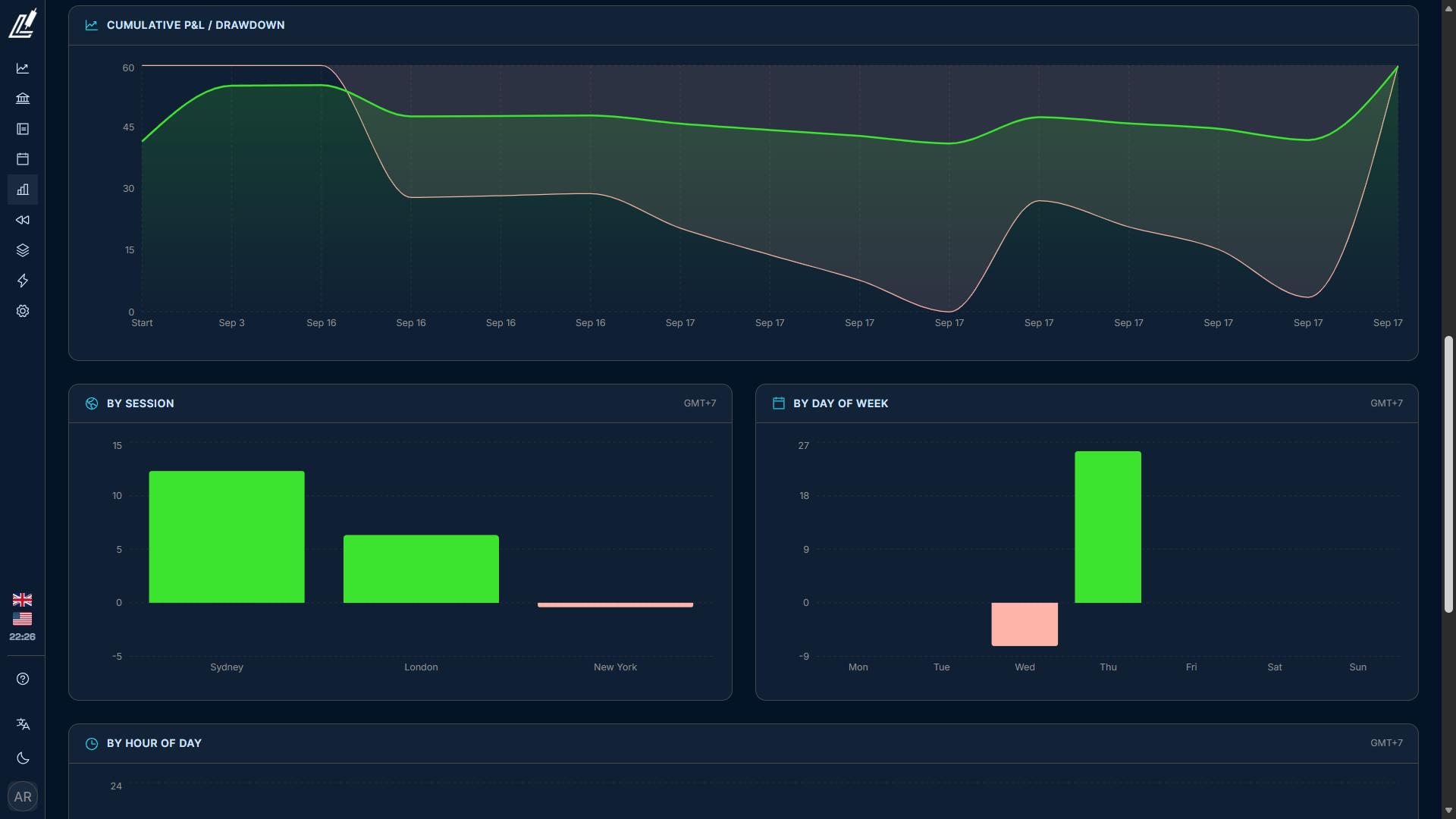
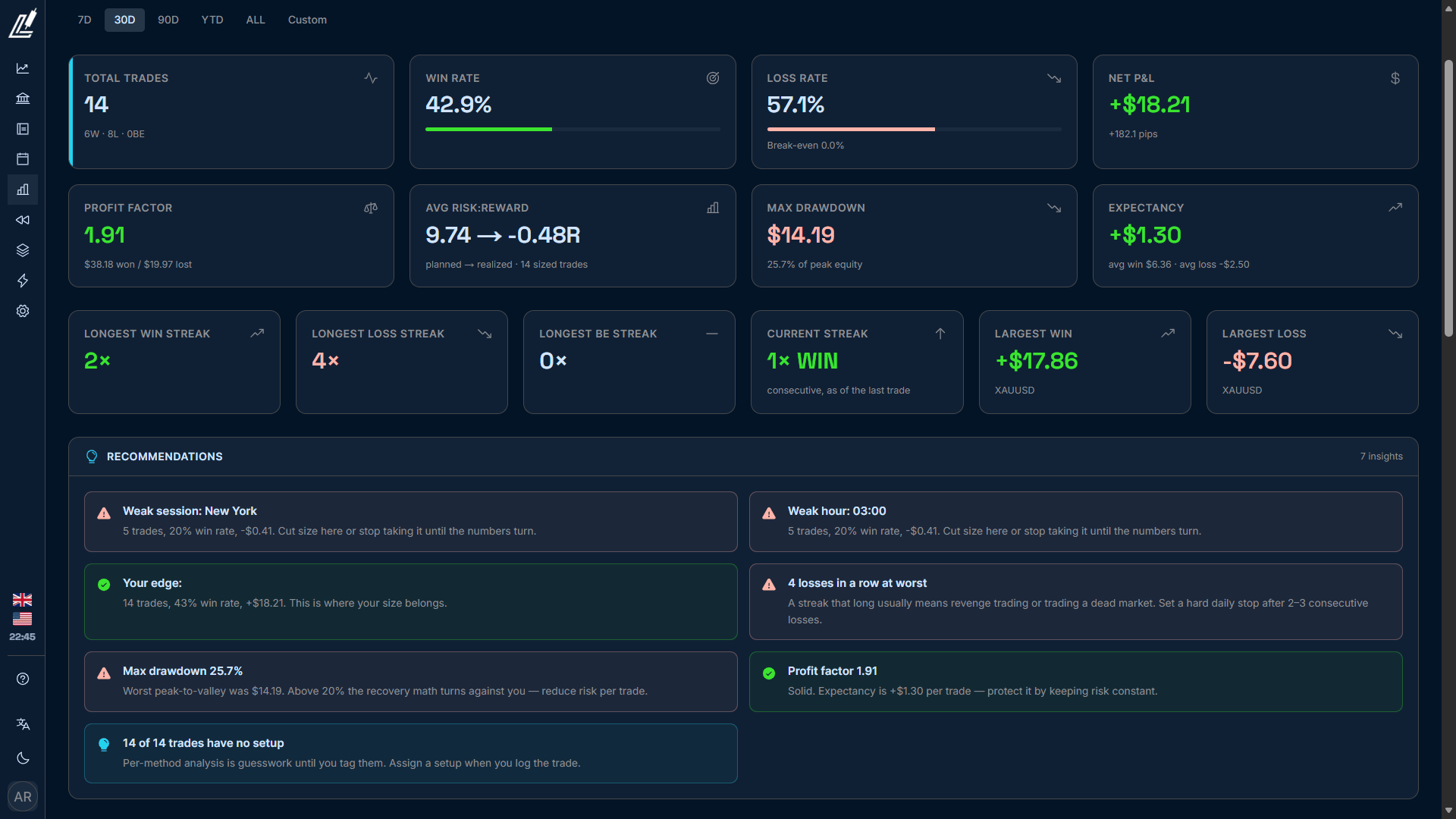
Win rate only scratches the surface. LOGTRADE calculates profit factor, expectancy, max drawdown, equity curve, and realized R vs planned R, then breaks it all down by setup, pair, session, day, and even hour.
You'll find things you'd rather not hear. That's the point.
Set your rules. Prove you follow them.
Write your setup's rules down once: which ones are required, which are optional. On every trade, tick off the ones you met.
After 50 trades you'll see it for yourself: the trades that met every rule perform very differently from the ones you forced.
Your emotions have numbers too
Log your emotion and confidence level at two points: at entry and at close. Calm, Anxious, FOMO, Fear, Greed, Overconfident, Hope, Revenge Trading, or make your own label.
Then look at the stats. If your “FOMO” trades only win 22% of the time, now you know for sure.
Plan and reality, side by side
Every trade has two sides: what you planned, and what actually happened. Moved your SL? Closed before TP? It's on record.
Is your realized R always below your planned R? Then your execution is what needs work.
All your accounts, one dashboard
Real, cent, and prop firm accounts stay neatly apart, each with its own currency (USD, EUR, IDR, CENT). Deposits and withdrawals are recorded, and the balance keeps itself up to date.
When you add a new entry, a safe lot size shows up right away, worked out from your risk % and account balance. No separate calculator needed.
Test your setups without waiting for the market
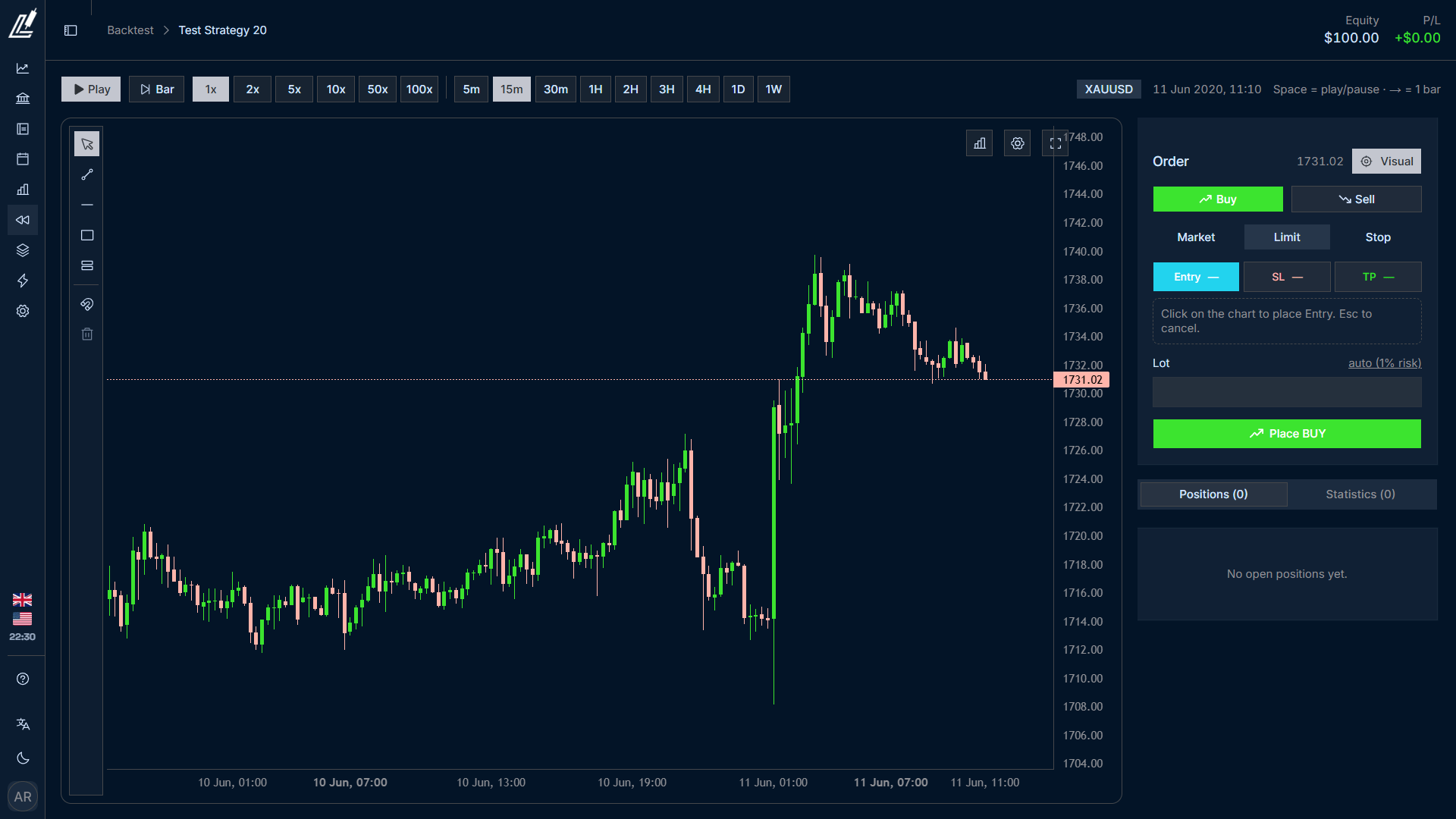
Replay the chart bar by bar, place BUY/SELL right on the chart with SL and TP, move SL to BE, close half the position. Speeds from 1x to 10x, or step one bar at a time when you want to be precise.
Your trendlines, fibs, and rectangles are saved with the session. Close the laptop and pick up from the same bar tomorrow. The summary then uses exactly the same metrics as your live trading.
Backtest sessions are kept completely separate from your live trading stats, so practice results never mix with real account numbers.
20+ metrics. Calculated from the trades you save.
- Win Rate
- Loss Rate
- Break-Even Rate
- Net P&L
- Net Pips
- Profit Factor
- Expectancy
- Average Win
- Average Loss
- Planned R:R
- Realized R
- Max Drawdown $
- Max Drawdown %
- Equity Curve
- Longest Win Streak
- Longest Loss Streak
- Current Streak
- Largest Win
- Largest Loss
- Avg Wait to Fill
Break all of it down by session, day, hour, setup, pair, direction and order type, filtered by 7D / 30D / YTD / All / Custom.
Why not use a spreadsheet?
| Spreadsheet | LOGTRADE | |
|---|---|---|
| Logging one trade | 5-10 minutes of typing | ~30 seconds, one screenshot |
| Auto-fill from MetaTrader | No | Yes |
| Price | Free | Free to start, Pro $5 |
| Analytics by setup/session/hour | Build it yourself | Yes |
| Rule checklist | Manual | Yes, per setup |
| Psychology tracking | A text column | Entry + close, measurable |
| Backtest / chart replay | No | Yes, in the same app |
| Instruments | Build it yourself | Forex, XAU/Gold, indices, crypto, commodities |
| Language & local context | None | Indonesian and English, cent accounts supported |
| How long you keep it up | 2 weeks | Up to you, but there's no excuse left to skip it |
A spreadsheet is free, but you pay with time and consistency. Those are the two most expensive things a trader has.
Cheaper than a single SL.
Every plan includes MetaTrader auto-fill, rule checklists, and psychology tracking. The only difference is how much you use.
Free
Free, no credit card
For finding out whether a journal makes a difference to your trading.
- 1 trading account
- 10 trades per month (resets on the 1st)
- Unlimited MetaTrader auto-fill: the image fills in the fields and isn't stored
- Full rule checklist & psychology tracking
- Plan vs Actual (realized R)
- Basic analytics (win rate, net P&L, net pips, equity curve, streaks)
- 1 backtest session per month
- Last 90 days of history
- 1080×1920 share card export
Pro
~Rp 79.000/month
For traders who are serious about it and trade every week.
- Unlimited trades
- Saved screenshots: 10 per trade (before / entry / after), ready to review anytime
- 3 trading accounts
- Full analytics: profit factor, expectancy, realized vs planned R, drawdown, streaks
- Breakdown by setup, pair, session, day, and hour
- Self-evaluation scoring (execution, plan adherence, psychology)
- 10 backtest sessions per month, all replay speeds
- Unlimited history
Ultra
~Rp 149.000/month
For traders running many accounts or chasing a prop firm challenge.
- Unlimited trading accounts (real, cent, prop firm)
- 20 screenshots per trade
- MT5 History import: pull in hundreds of trades at once from an MT5 report instead of entering them one by one
- Unlimited backtest sessions
- Custom trading sessions & MetaTrader timezone
- New pair requests handled first
- Priority support
Stop anytime with one click. Your data stays visible even if you drop to Free: it's limited, never deleted.
Questions people usually ask
How accurate is the auto-fill?
For a clear, uncropped MetaTrader position details screenshot, accuracy is high. Every field can still be edited before you save, so if one number comes out wrong, you fix it.
Is it safe? Do you need my MetaTrader login?
No, and we never will. LOGTRADE doesn't connect to your broker and never asks for your MetaTrader password or investor password. We only read the screenshot, and even that is processed in your own browser.
Does it work with MT4?
Every journal, analytics, rule checklist, and backtest feature works fully with MT4. No difference at all.
Auto-fill is the exception: we tuned and tested it on the MT5 position details panel. MT4 screenshots will probably be read too, since the labels are identical (S/L, T/P, Swap, buy/sell), but we haven't officially tested them, so we don't promise it yet. If a field comes out wrong, fix it before saving. Every field is editable.
History import is MT5-only, because it reads the MT5 XLSX report. MT4 exports its report as .htm, which has a different structure.
Are cent accounts supported?
Yes. Cent is one of the account currency options, so P&L is calculated correctly and doesn't throw off your stats.
I trade on my phone. Does that work?
Yes. LOGTRADE runs in your phone's browser. Pick a screenshot from MetaTrader mobile and the fields fill in right away.
So the Free plan doesn't save screenshots?
Correct, but auto-fill still works fully. Your screenshot is read in the browser to fill in the fields, then thrown away. It isn't uploaded anywhere. What Pro adds is that the image is saved with the trade, so three months later you can still see the chart from the moment you entered, along with the numbers.
What about instruments other than forex and gold?
Covered. The categories are forex, metals (XAU/XAG), indices, crypto, and commodities. Pip value and pip decimals are set correctly per instrument, so XAUUSD isn't calculated with a forex pair formula.
If your instrument isn't in the catalog yet, request it and we'll add it.
How long until I see results?
The stats start to mean something at around 20-30 trades. Below that the sample is too small, and LOGTRADE tells you when there isn't enough data to draw conclusions instead of showing you misleading numbers.
What happens to my data if I stop subscribing?
It stays. Dropping to Free limits features; it doesn't delete data. Your second account becomes read-only, old screenshots stay visible, and old journal entries remain, though only the last 90 days are shown. Only new additions are blocked.
Your next 300 trades can become data. Or they can disappear again.
You'll be trading this month anyway. Next month, do you want to know what worked and what didn't, or still be guessing like you are now?
Free forever, no credit card. Setup takes 2 minutes.